D.E.B.O. : A voice agent you can hand your store to
| Role | AI engineer |
| Duration | 2 months |
| Stack | Python, Next.js, OpenCV, Qwen2.5-VL, Docker |
| Focus | Computer vision, LLM agents, retail automation |
What it does
D.E.B.O. (Data Enhanced Business Operator) - No relation - is a voice agent for a retail store shelf. You say what you want checked or changed, and it talks back to you for confirmation or explanation, then does it. Its capacity includes pulling camera snapshots and reporting what's wrong, blinking Electronic Shelf Tags (ESLs) next to a product, updating prices, or putting up directions to a certain product for customers.
It runs on a retail-corner demo I built during my internship at Tata Consultancy Services, as one piece of a larger platform that also pulls in RFID and VOC (Volatile Organic Compounds) sensors for inventory and freshness tracking. This page covers the voice agent itself and ShelfWatch (the system that acts as its eyes in the store).
Why retail tech doesn't talk to itself
A store associate checking on a shelf touches three or four separate systems during their rounds: a camera feed to see it, an ESL management console to fix or update a price, a planogram spreadsheet to know what should be there, as well as customers when they need to tell them where the shampoo is. None of these 'facets' of retail really know about each other.
Fixing a mispriced or misplaced tag entails a detour through a back-office tool built for warehouse staff with higher authorization or privileges, not for a worker standing in the aisle. D.E.B.O. transforms this detour through store bureaucracy into a more seamless experience.
How it works
There are two processes running side by side: a Next.js 16 app for the interface, and a FastAPI voice server talking over a WebSocket. Speak into the browser, and the audio streams to the server as raw PCM. faster-whisper transcribes it.
Most shelf commands - "blink ipuro", "check the cameras", "change the price to 5.99" - match a regex pattern and execute immediately, skipping the language model entirely. Everything else goes to Gemma 4 through Ollama, running locally with a small tool registry. Kokoro turns the reply into speech and streams it back sentence by sentence.
The fast path exists for two reasons. Language models occasionally refuse to "take physical actions" when asked directly, and even a compliant one adds a full round trip of latency to a task that should feel instant. Matching the command first means an ESL tag blinks in under a second.
Mic audio
Browser streams raw PCM over WebSocket
faster-whisper
Local speech-to-text, no cloud call
Fast-path regex, or Gemma 4
Shelf commands skip the LLM entirely
Kokoro TTS
Streamed back sentence by sentence
ShelfWatch: giving it eyes
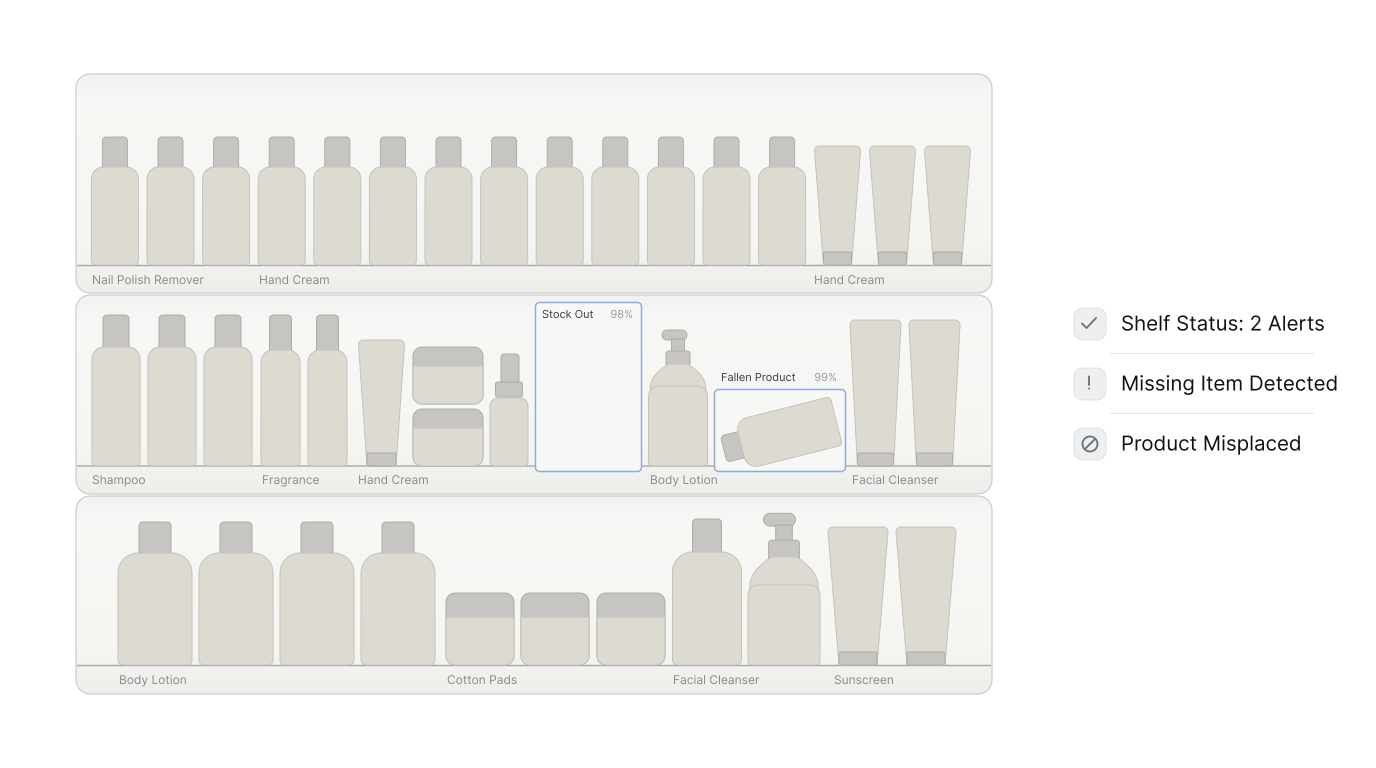
ShelfWatch is the piece that lets D.E.B.O. see the shelf. Say "check the cameras", and it pulls a live snapshot from an Axis IP camera (digest auth handled in a proxy route, since the camera doesn't make that easy), shows it in the chat panel, and runs it through Gemma 4's vision mode against a fixed planogram: two boxes of Ipuro Lavender Touch, one bottle of Lakme nail polish remover.
The vision call runs on a background thread, so the camera feed and a loading state appear immediately instead of freezing the interface while inference runs. It reports back as one of four states: LOW_STOCK, STOCKOUT, FALLEN_OBJECT, or SHELF_NOT_VISIBLE if the camera can't see a valid shelf at all. A clean shelf gets a plain "no alerts" banner instead of a wall of checkmarks.
Axis camera snapshot
Pulled through a digest-auth proxy route
Gemma 4 vision
Checked against a fixed planogram, on a background thread
Alert card
LOW_STOCK, STOCKOUT, FALLEN_OBJECT, or a clean banner
Reverse-engineering the label vendor
The retail corner's electronic shelf labels run on a vendor platform with no public API documentation. Getting D.E.B.O. to blink a tag or push a price meant opening the vendor's own web console, watching its network traffic, and reading through DevTools until the undisclosed endpoints and their authentication flow were clear enough to call directly.
That reverse-engineered API is what the agent's tag and pricing tools actually talk to underneath the conversation.
A human still says yes
Not every price change should happen the instant someone asks - What if it was wrong or misinterpreted? The compliance flow catches any and all mismatches between the requested change and the database of actual prices, and then makes a human confirm by saying 'yes' before anything touches the label.
Ask "are my tags compliant?" and D.E.B.O. shows a reference image of the tag, points out that the nail polish remover is priced wrong, and asks whether to fix it. Say yes, and it corrects the label through the same API. Say no, and it leaves the shelf alone.
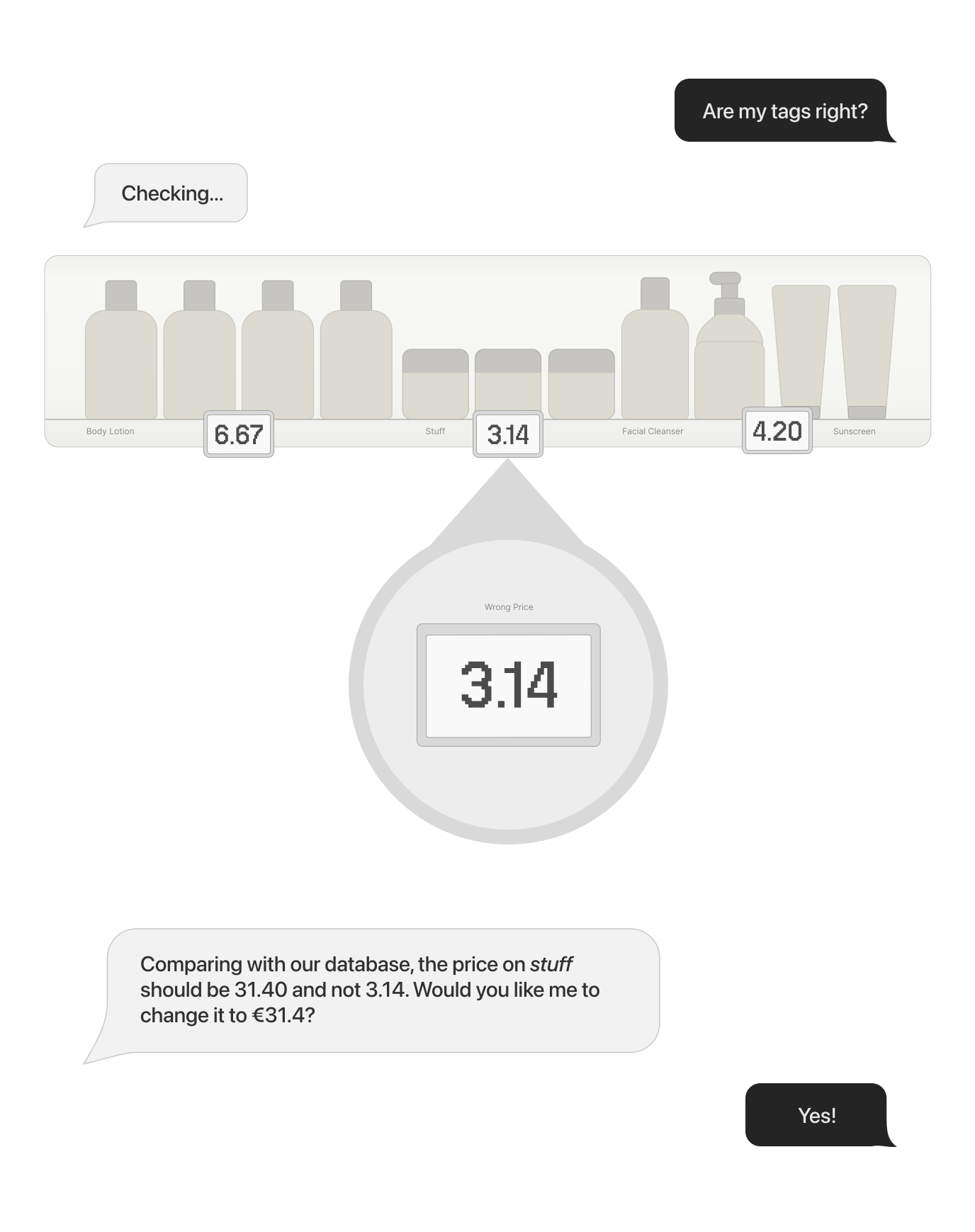
Power users can skip straight to a direct command, like "change the price of ipuro to 15.99", which updates the price field only, never the product name or any other label data. The split comes down to certainty: direct execution where the request is unambiguous, and a checkpoint everywhere else.
Lost and can't find what you're looking for?
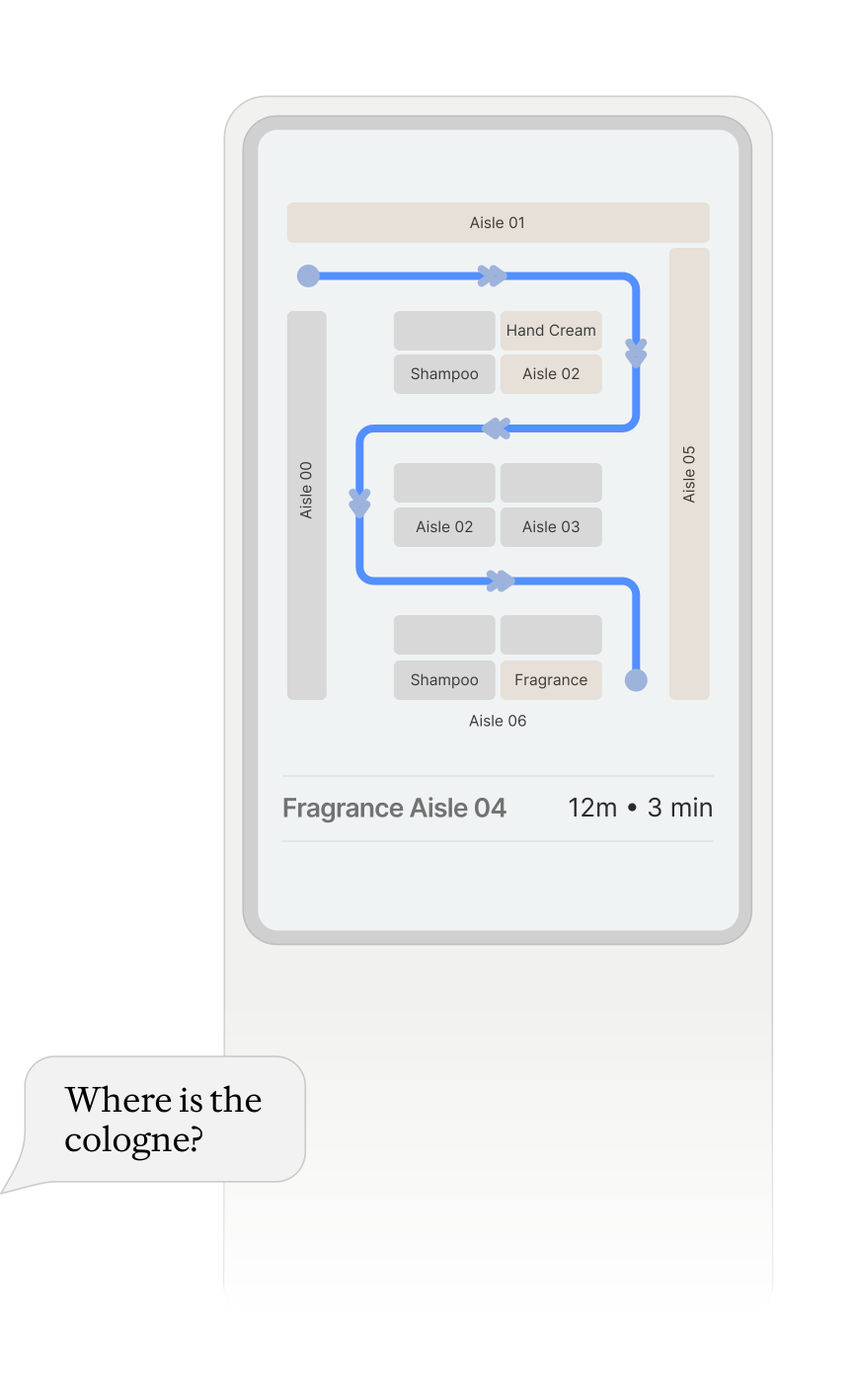
So say you walked into a giant store and need to find something you're looking for - and like me, you have no intention of asking someone for directions. For such people like you and me, A customer-facing display is there to help you. Ask where the sponge balls are, and D.E.B.O. answers out loud while broadcasting a floorplan to the screen, so that any customer gets a visual answer without an associate needing to walk you to the product isle or without having to give directions that may be confusing (or sometimes wrong). This comes with the added benefit of still getting you to the right product even after major layout shifts happen in the store or outright telling you something is unavailable without you having to waste your time searching the whole store.
Before and after
| Task | Before | With D.E.B.O. |
|---|---|---|
| Shelf compliance check | Manual walk-through, hours to days | ~30 sec: snapshot, vision pass, alert cards |
| ESL price correction | Back-office update, then verify on the floor: 15-30 min | ~10 sec voice command, or a guided approval flow |
| Finding a product on shelf | Staff escort or static signage | ~10 sec: ESL blink or a spoken aisle location |
| Customer wayfinding | Printed map or asking an associate | ~10 sec: floorplan pushed to a second screen |
What the production version looks like
The fast-path and LLM-path split works for a demo with two products and a handful of phrasings. It stops working the moment a real store adds a thousand SKUs and a hundred ways to ask for them, more alias matching, more phrasings for the same price change, a planogram that has to come from a database instead of two product names hardcoded in a Python file.
Vision alerts are better treated as a prompt to go look than as a verdict. An occluded shelf or a promotional display can still fool them, which is the reasoning for keeping a human inside the price-change flow rather than letting the model act alone.
The fix for the scale problem is the same split the demo already uses for voice, moved up a layer: fast path for the things you can define, model for the things you can't.
What the camera should be doing
Planogram compliance is a closed-set problem. The SKUs are known, the slot layout is known, and the question is only whether the right box is in the right place. A fine-tuned YOLOv8 detector answers that in 20 to 40 milliseconds on a Jetson Orin sitting in the back room, at a cost per frame that makes running it continuously reasonable rather than something you trigger by hand.
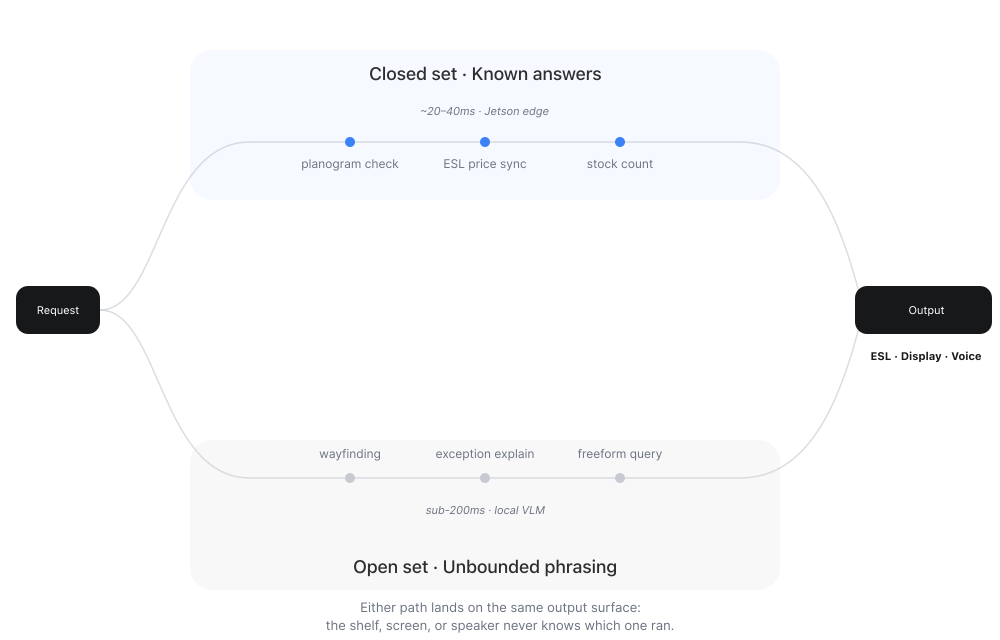
The vision-language model earns its place on the questions that have no fixed answer set. A shopper asking where the gluten-free pasta is. An associate photographing a wrecked end-cap and asking what's wrong with it. Those cannot be enumerated in advance, which is the actual test for whether a task belongs to a model or a detector.
Why I chose Qwen2.5-VL-7B
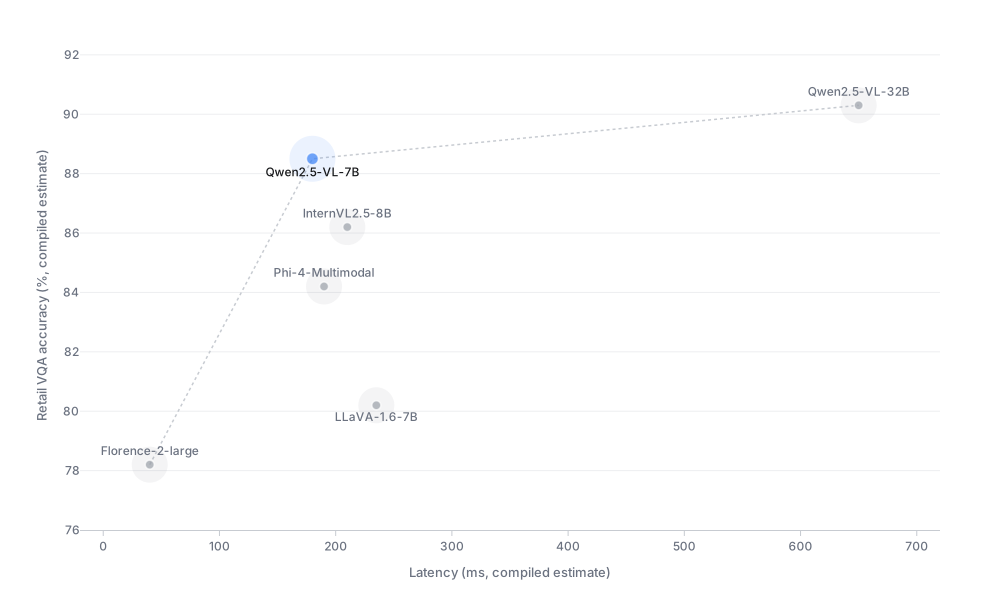
Qwen2.5-VL-7B uses window attention in its visual encoder, so compute scales linearly with the number of image patches instead of quadratically. That is the specific property that makes sub-200ms inference on a single local GPU plausible rather than aspirational. It also leads open-source models on OCR-heavy benchmarks, which is not a general-quality argument, it is the exact capability this system needs, since almost every vision task here ends in reading a shelf tag, a price label, or a directory sign.
InternVL2.5-8B and LLaVA-1.6-7B are competitive on general VQA and fall behind on OCR under quantization. Florence-2 is faster than all of them and too weak on open-ended reasoning to carry a wayfinding conversation.